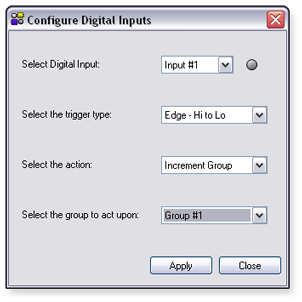
Configure Digital Inputs

The DMP 44 LC has three digital input ports located on the rear panel. The default state of the digital input is logic Hi (not shorted), with no actions (off). Configuration of these ports is performed only through DSP Configurator, either in Live or Emulate mode. Digital input configuration settings are saved with the configuration file.

Configuring a Digital Input

Each digital input port can be configured to perform one of the following functions:

  • No Action/Off — The port is "off," or not configured. This is the default.

  • Mute/Unmute Group —  A group master mute state is toggled from mute to unmute. For use with a group master mute control only.

  • Increment Group — A group master gain control increments in 1 dB steps. For use with a group master gain control only.

  • Decrement Group — A group master gain control decrements in 1 dB steps. For use with a group master gain control only.

  • Recall Preset — A single preset is recalled.

For any of these functions to be fully operational, the group or preset must also be configured. See the "Configure Groups" and "Presets" section for more information about configuring groups and presets.

There are several ways in which the functions can be triggered:

  • Not Configured — Digital Inputs are not being monitored.

  • Edge - Hi to Lo — Triggers a function when the port transitions from a Hi to Lo state.

  • Edge - Lo to Hi — Triggers a function when the port transitions from a Lo to Hi state.

  • Level - Lo —  Triggers a function when the port is in a Lo state.

  • Level - Hi — Triggers a function when the port is in a Hi state.

The combinations of functions and triggers result in specific behaviors, as follows:

Function and Trigger Combination

Description

Trigger Settings

Mute/Unmute Group and Edge

Toggles Mute Group Control between mute and unmute every time a transition trigger occurs.

Edge - Hi to Lo

Edge - Lo to Hi

Group control toggles between mute and unmute on the transition from Hi to Lo.

Group control toggles between mute and unmute on the transition from Lo to Hi.

Mute/Unmute Group and Level

Toggles a Mute Group Control between mute and unmute in a
"push-to-talk" scenario.

Level - Lo

Level - Hi

Group control mutes when the port is in a Lo state, then unmutes when the port is in a Hi state.

Group control mutes when the port is in a Hi state, then unmutes when the port is in a Lo state.

Increment or Decrement Group and Edge

Increments or decrements a Gain Group Control by a 1 dB step.

Edge - Hi to Lo

Edge - Lo to Hi

Group control increments or decrements on the transition from Hi to Lo.

Group control increments or decrements on the transition from Lo to Hi.

Increment or Decrement Group and Level

Increments or decrements a Gain Group Control by a 1 dB step.

Level - Lo

Level - Hi

Group control increments or decrements one time when the port is in a Lo state.

Group control increments or decrements one time when the port is in a Hi state.

Preset Recall and Edge

This is the only possible combination for a preset recall.

Edge - Hi to Lo

Edge - Lo to Hi

The selected preset is recalled on the transition from Hi to Lo.

The selected preset is recalled on the transition from Lo to Hi.

To configure a digital input:

  1. From the Tools menu, select Configure Digital Inputs. The Configure Digital Inputs dialog box opens.

  1. From the Select an Input to configure drop-down list, select the digital input to configure. An indicator beside the drop-down list, lights green when the port is Lo.

  2. From the Select the trigger to monitor for drop-down list, select a trigger.

  3. From the Select a function for this input drop-down list, select the action that will result when the trigger occurs.

  4. From the Select the group to act upon drop-down list, select the group for which this function and trigger will occur.

  5. Click Apply.

  6. Click Close to close the dialog and return to the main workspace.